
Qwen 3.5: The Complete Guide - Benchmarks, Local Setup, and How It Stacks Up Against Every Major Model

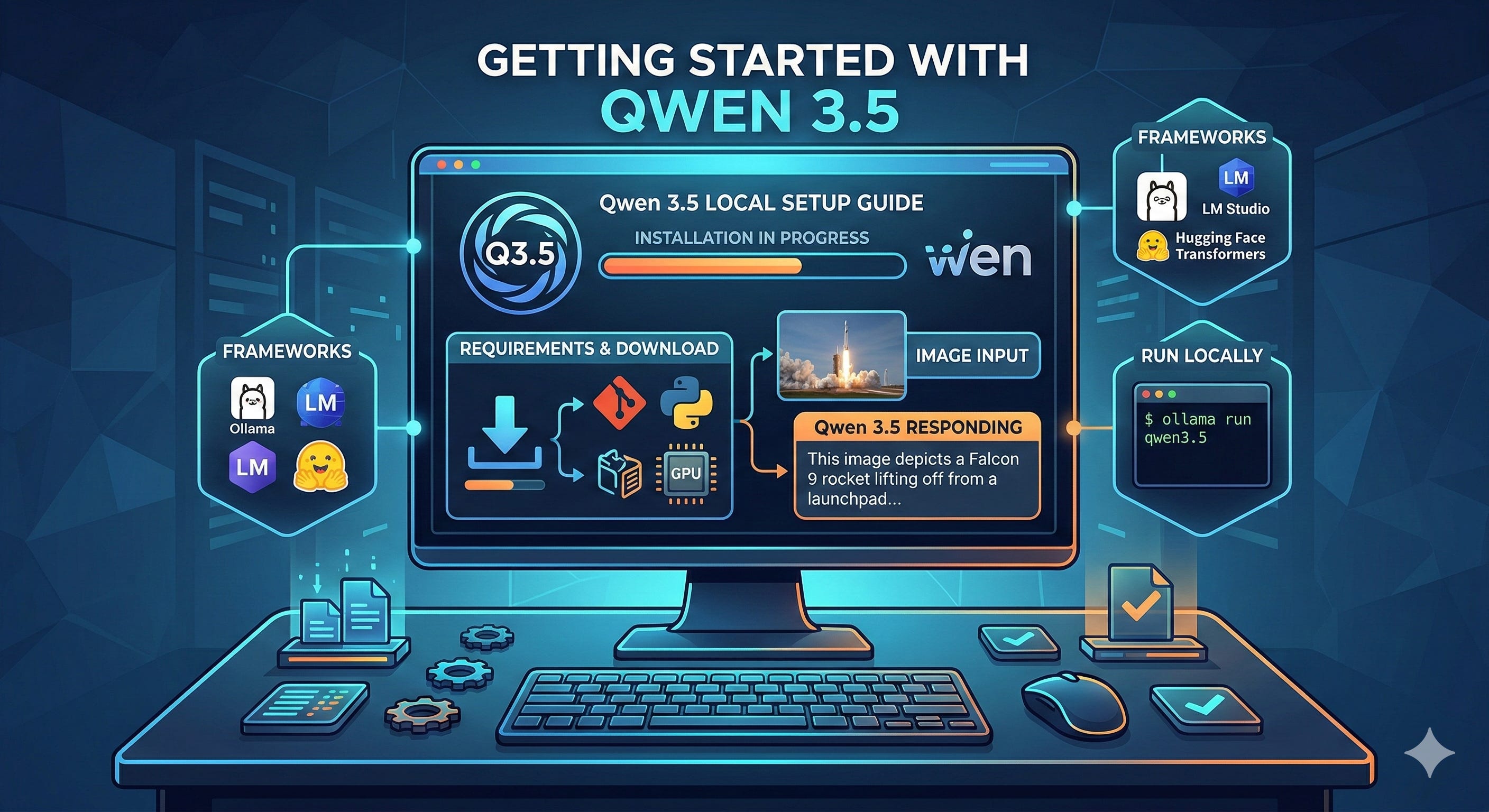
Alibaba’s Qwen team dropped Qwen 3.5 on February 16, 2026, and it immediately shook up the AI landscape. Built on a sparse Mixture-of-Experts (MoE) architecture, the flagship Qwen3.5-397B-A17B packs 397 billion total parameters while activating only 17 billion per forward pass - delivering frontier-level intelligence at a fraction of the compute cost. Released under the Apache 2.0 license, it’s fully open-weight, commercially usable, and runnable on consumer hardware.
This article breaks down the benchmarks, walks you through setting it up locally, and gives you an honest comparison against Claude Opus 4.6, GPT-5.2, Gemini 3 Pro, and others.
The Qwen 3.5 Model Family
Qwen 3.5 isn’t a single model - it’s a family spanning multiple sizes, released in three waves:
Flagship (Feb 16, 2026): Qwen3.5-397B-A17B - the headline model with 397B total / 17B active parameters, supporting 256K context across 201 languages.
Medium Series (Feb 24, 2026): Qwen3.5-27B (dense), Qwen3.5-35B-A3B, and Qwen3.5-122B-A10B - open-weight models targeting the sweet spot between performance and efficiency.
Small Series (Mar 2, 2026): Qwen3.5-0.8B, 2B, 4B, and 9B - compact models that punch far above their weight class.
All models support both “thinking” and “non-thinking” modes, excel at agentic coding, vision, chat, and long-context tasks, and are licensed under Apache 2.0.
Benchmark Results: How Qwen 3.5 Compares to Every Major Model
Math and Reasoning
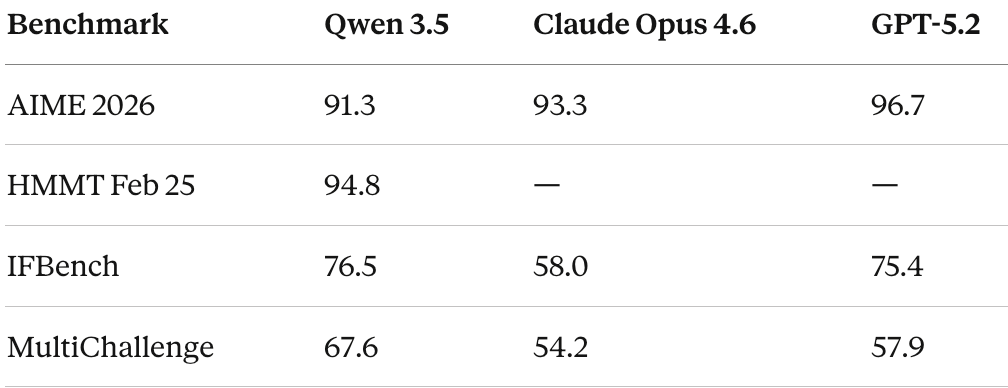
Qwen 3.5 is highly competitive in mathematical reasoning, though it doesn’t universally lead. On AIME 2026, it scores 91.3 - strong, but behind GPT-5.2 (96.7) and Claude Opus 4.6 (93.3). On HMMT Feb 2025, it hits 94.8, which is more competitive.
Where Qwen 3.5 truly shines is instruction following. On IFBench, it scores 76.5, beating GPT-5.2 (75.4) and significantly outpacing Claude (58.0). MultiChallenge tells the same story: 67.6 vs. GPT-5.2’s 57.9 and Claude’s 54.2. These results suggest Qwen 3.5 is exceptionally good at understanding and following complex, multi-step instructions.
Coding
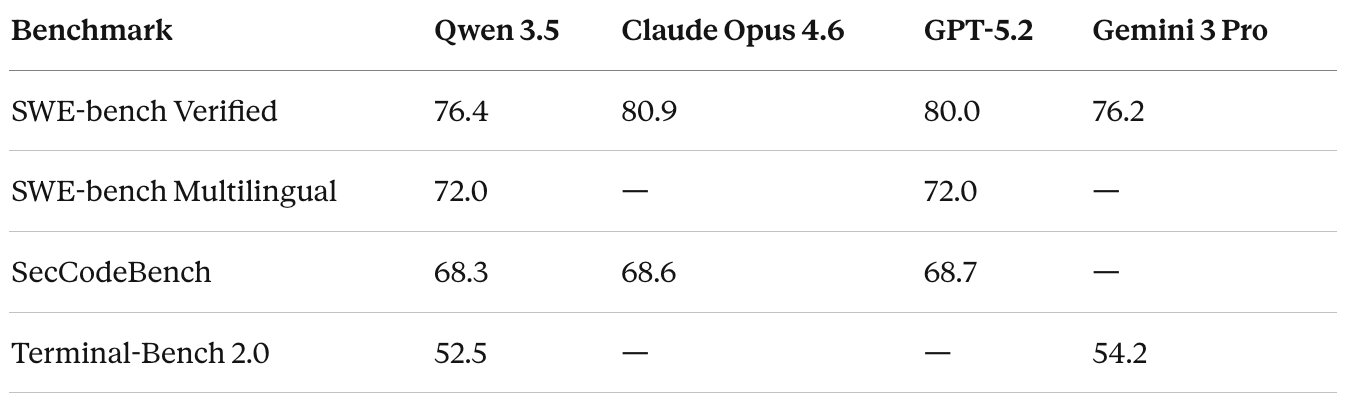
Coding is arguably the most contested arena, and the results here are nuanced. On SWE-bench Verified - the gold standard for real-world coding ability - Qwen 3.5 scores 76.4. That’s essentially level with Gemini 3 Pro (76.2) but behind GPT-5.2 (80.0) and Claude Opus 4.6 (80.9). Claude maintains a clear edge in agentic coding tasks.
On SWE-bench Multilingual, Qwen 3.5 does better at 72.0, matching GPT-5.2. And on SecCodeBench (security-focused coding), it’s essentially tied with the leaders: 68.3 vs. GPT-5.2’s 68.7 and Claude’s 68.6.
The most dramatic improvement over Qwen’s previous generation shows up in Terminal-Bench 2.0, where Qwen 3.5 scores 52.5 - up from just 22.5 for Qwen3-Max-Thinking.
Vision and Multimodal
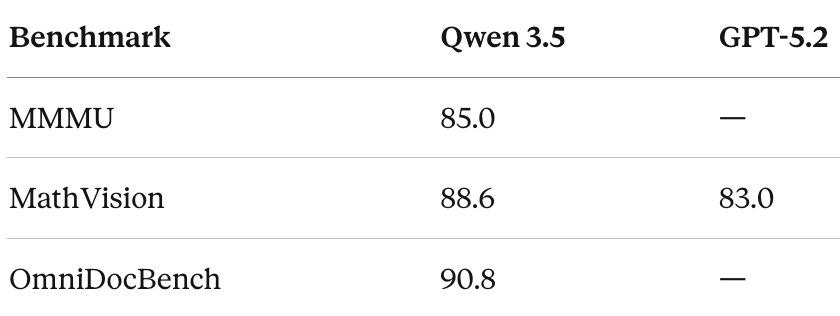
This is where Qwen 3.5 flexes hardest. As a natively multimodal model, it dominates several visual benchmarks. It scores 85.0 on MMMU (up from Qwen3-VL’s 80.6), 88.6 on MathVision (beating GPT-5.2’s 83.0 and Gemini 3 Pro’s 86.6), and 90.8 on OmniDocBench.
If your workload is vision-heavy - document understanding, chart reading, visual reasoning - Qwen 3.5 is arguably the best open-weight model available today.
Agentic Tasks
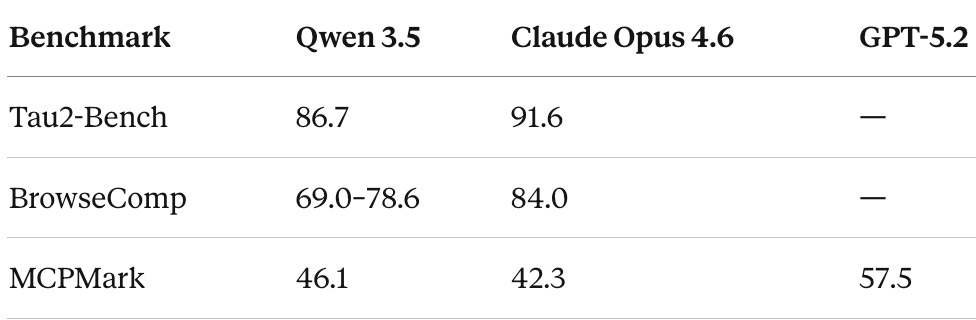
Agentic capabilities -the ability to plan, use tools, browse the web, and complete multi-step tasks - are increasingly the differentiator between good and great models.
On Tau2-Bench, Qwen 3.5 scores 86.7, second only to Claude Opus 4.6 (91.6). Claude’s lead here is significant and consistent with its reputation as the strongest agentic model.
On BrowseComp (agentic web browsing), Qwen 3.5 scores between 69.0 and 78.6 depending on the search strategy, outperforming Gemini 3 Pro (59.2) but trailing Claude Opus 4.6 (84.0).
Tool use is another strong suit. The medium-sized Qwen3.5-122B-A10B scores 72.2 on BFCL-V4, outperforming GPT-5 mini (55.5) by 30% - making it one of the strongest open-source models for function-calling agents.
Overall Intelligence Ranking
According to Artificial Analysis’s Intelligence Index (March 2026), the top models rank as follows:
Gemini 3.1 Pro Preview - 57
GPT-5.3 Codex (xhigh) - 54
Claude Opus 4.6 (Adaptive Reasoning, Max Effort) - 53
Claude Sonnet 4.6 (Adaptive Reasoning, Max Effort) - 52
GPT-5.2 (xhigh) - 51
Qwen 3.5 variants rank below these on the composite index, but the gap is narrower than the ranking suggests - and Qwen wins outright on specific tasks like instruction following and multimodal understanding.
The Small Models Deserve Attention
Don’t sleep on the small series. Qwen3.5-9B matches or surpasses GPT-OSS-120B (a model 13x its size) across multiple benchmarks: GPQA Diamond (81.7 vs. 71.5), HMMT Feb 2025 (83.2 vs. 76.7), and MMMU-Pro (70.1 vs. 59.7). This is remarkable efficiency, and it means genuinely useful AI on a laptop or phone.
How to Set Up Qwen 3.5 Locally
Running Qwen 3.5 on your own hardware is straightforward. Here are three approaches, from easiest to most customizable.
Option 1: Ollama (Recommended for Most Users)
Ollama is the simplest path. It handles model downloads, quantization, and GPU detection automatically.
Step 1 — Install Ollama. Download and install from ollama.com. It auto-detects Apple Silicon (Metal acceleration), NVIDIA GPUs (CUDA), and AMD GPUs (ROCm).
Step 2 — Pull and run a model. Open your terminal and run one of the following:
bash
# Small models (run on almost anything)
ollama run qwen3.5:0.8b    # ~500MB, minimal hardware
ollama run qwen3.5:2b      # ~1.5GB
ollama run qwen3.5:4b      # ~2.5GB
ollama run qwen3.5:9b      # ~5GB

# Medium models (need decent hardware)
ollama run qwen3.5:27b     # ~16GB, needs 24GB+ RAM/VRAM
ollama run qwen3.5:35b-a3b # MoE, efficient for its capability

# Flagship (needs serious hardware)
ollama run qwen3.5         # 397B-A17B, needs 200GB+ RAM
Step 3 — Chat. Type your questions and press Enter. Press Ctrl+D to exit. That’s it.
Step 4 — Use it as an API. Ollama exposes an OpenAI-compatible API at
http://localhost:11434
by default:
bash
curl http://localhost:11434/v1/chat/completions \
  -H "Content-Type: application/json" \
  -d '{
    "model": "qwen3.5:9b",
    "messages": [{"role": "user", "content": "Explain MoE architectures"}]
  }'
Option 2: llama.cpp (Maximum Control)
For production deployments or when you want fine-grained control over quantization and resource allocation.
Step 1 — Install dependencies:
bash
pip install huggingface_hub hf_transferStep 2 — Download a quantized model. Use at least 2-bit dynamic quantization (UD-Q2_K_XL) for a good balance of size and accuracy. For better quality, use UD-Q4_K_XL or MXFP4_MOE:
bash
huggingface-cli download unsloth/Qwen3.5-397B-A17B-GGUF \
  --include "Qwen3.5-397B-A17B-UD-Q4_K_XL*" \
  --local-dir ./qwen3.5-397b
Step 3 — Start the server:
bash
llama-server \
  --model ./qwen3.5-397b/Qwen3.5-397B-A17B-UD-Q4_K_XL.gguf \
  --threads 32 \
  --ctx-size 16384 \
  --n-gpu-layers 2 \
  --port 8080
Adjust --threads for your CPU core count, --ctx-size for your desired context window, and --n-gpu-layers for GPU offloading. Remove the GPU flag entirely for CPU-only inference.
This gives you an OpenAI-compatible API at
http://localhost:8080
Option 3: Hugging Face Transformers (Python Native)
Best for integration into Python ML pipelines:
python
from transformers import AutoModelForCausalLM, AutoTokenizer

model_name = "Qwen/Qwen3.5-27B"

tokenizer = AutoTokenizer.from_pretrained(model_name)
model = AutoModelForCausalLM.from_pretrained(
    model_name,
    torch_dtype="auto",
    device_map="auto"
)

messages = [{"role": "user", "content": "What makes MoE efficient?"}]
text = tokenizer.apply_chat_template(messages, tokenize=False, add_generation_prompt=True)
inputs = tokenizer([text], return_tensors="pt").to(model.device)

output = model.generate(**inputs, max_new_tokens=512)
print(tokenizer.decode(output[0], skip_special_tokens=True))
For higher throughput in production, consider vLLM or SGLang as serving backends.
Hardware Requirements at a Glance
ModelMinimum RAM/VRAMRecommended Setup0.8B2GBAny modern laptop2B4GBAny modern laptop4B6GBLaptop with 8GB+ RAM9B8GB16GB laptop or 10GB GPU27B (Q4)20GB24GB GPU (RTX 4090, A6000)35B-A3B22GB24GB GPU or M-series Mac397B-A17B (Q4)~214GB256GB M3 Ultra or multi-GPU
For the flagship 397B model with Q4 quantization, one tester reported 25+ tokens/second on a single 24GB GPU with 256GB system RAM using MoE offloading. The 27B model achieves roughly 20 tokens/second on an RTX A6000.
The Bigger Picture: Where Each Model Wins
After reviewing the benchmarks and real-world tests, here’s the honest breakdown:
Choose Claude Opus 4.6 if you need the strongest agentic capabilities, best-in-class SWE-bench coding performance, long-context handling (1M token window), and enterprise-grade reliability. It leads on Tau2-Bench and BrowseComp and remains the most capable model for complex multi-step reasoning tasks.
Choose GPT-5.2 / 5.3 if you need top-tier mathematical reasoning (AIME 2026 leader), strong coding, and deep integration with the OpenAI ecosystem.
Choose Gemini 3 Pro / 3.1 if you want the highest composite intelligence score and strong multimodal capabilities within Google’s ecosystem.
Choose Qwen 3.5 if you want open-weight access with commercial freedom, the strongest vision/multimodal performance among open models, exceptional instruction following, multilingual support across 201 languages, or you simply need to run a powerful model locally without API costs. The cost advantage is significant — Qwen 3.5 is roughly 13x cheaper than Claude Opus 4.6 via API.
Final Thoughts
Qwen 3.5 represents a genuine inflection point for open-weight AI. It doesn’t beat Claude Opus 4.6 or GPT-5.2 on every benchmark - but it doesn’t need to. The fact that a fully open, Apache 2.0-licensed model is trading blows with closed frontier models across coding, reasoning, vision, and agentic tasks is the story.
For developers, researchers, and companies who need capable AI without vendor lock-in, Qwen 3.5 is the most compelling open-source option available today. And for the first time, the small models (especially the 9B) are genuinely useful for on-device deployment - not just toy demos, but real work.
The gap between open and closed is closing fast.
Note: Benchmark numbers are sourced from Alibaba’s official reports, Artificial Analysis, and independent evaluations. As with all self-reported benchmarks, take them with appropriate skepticism and verify against independent evaluations for your specific use case.
Nice
Good breakdown on the local setup. One thing I'd add: the Q4 quantised 4B is deceptively capable for its size. 2.5GB of weights, runs on laptops from five years ago, and it handles most daily tasks without embarrassing itself. The benchmarks tell one story but the practical experience of running it locally for a week tells a better one. Wrote up the hardware requirements and what each model size actually handles: https://reading.sh/your-laptop-is-an-ai-server-now-370bad238461?sk=1cf7a4391e614720ecbd6e9bc3f076a2